What Linear Does Well
To be genuinely fair: Linear is one of the best-crafted tools in software development. It rebuilt issue tracking around speed — keyboard-driven throughout, instant to navigate, with an interface disciplined enough that engineers actually enjoy living in it. For teams that felt buried under heavyweight project tooling, Linear's opinionated simplicity was a genuine reset: less configuration, fewer ceremonies, a tracker that gets out of the way.
The workflow model is equally well considered. Cycles give teams a lightweight sprint rhythm without process overhead. Projects and roadmaps roll issues up into a view of where larger efforts stand. Triage gives incoming work a disciplined front door instead of an ever-growing backlog of unsorted requests. It is a coherent, focused system — built by people who clearly use it themselves — and its design quality has earned real loyalty among software teams.
Nothing below argues Linear is deficient at what it does. It is excellent at what it does. The comparison is about scope: what a fast issue tracker covers, and what happens outside its edges.
The Core Distinction: The Issue Isn't the Intent
Linear manages work items, brilliantly. An issue is a unit of execution: title, description, state, cycle, assignee. That is what an engineering team needs to move fast. But an issue is downstream of a longer chain — a customer signal, an objective, a PRD, a story with acceptance criteria — and most of that chain lives somewhere else: strategy in one doc, research in another, requirements re-typed into the tracker. By the time the work is an issue, the reason behind it has been compressed away. When the issue closes, the loop back to the outcome it served rarely closes with it.
Feature1 is a product operating system: one connected model that runs the full product loop. Signals, objectives, capabilities, features, stories, sprints, and release communication live in a single product model, so a strategic decision becomes sprint-ready work without re-entering context — and every artifact links back to the decision that caused it.
Two capabilities carry that loop into code. Coding agents — Claude Code, Cursor, Codex CLI — read Feature1's user stories and acceptance criteria directly over MCP, so implementation starts from what the product team actually decided, on repos in GitHub, GitLab, or Bitbucket. And the codebase is attached as evidence: capability scans keep the product model grounded in what the code actually does, so the roadmap reflects the shipped product rather than the intended one.
This is a different layer, not a Linear replacement. Plenty of teams will keep Linear as the place engineering tracks its work. Feature1 carries the product intent the issue loses — from the signal that started the work to the release that closes the loop.
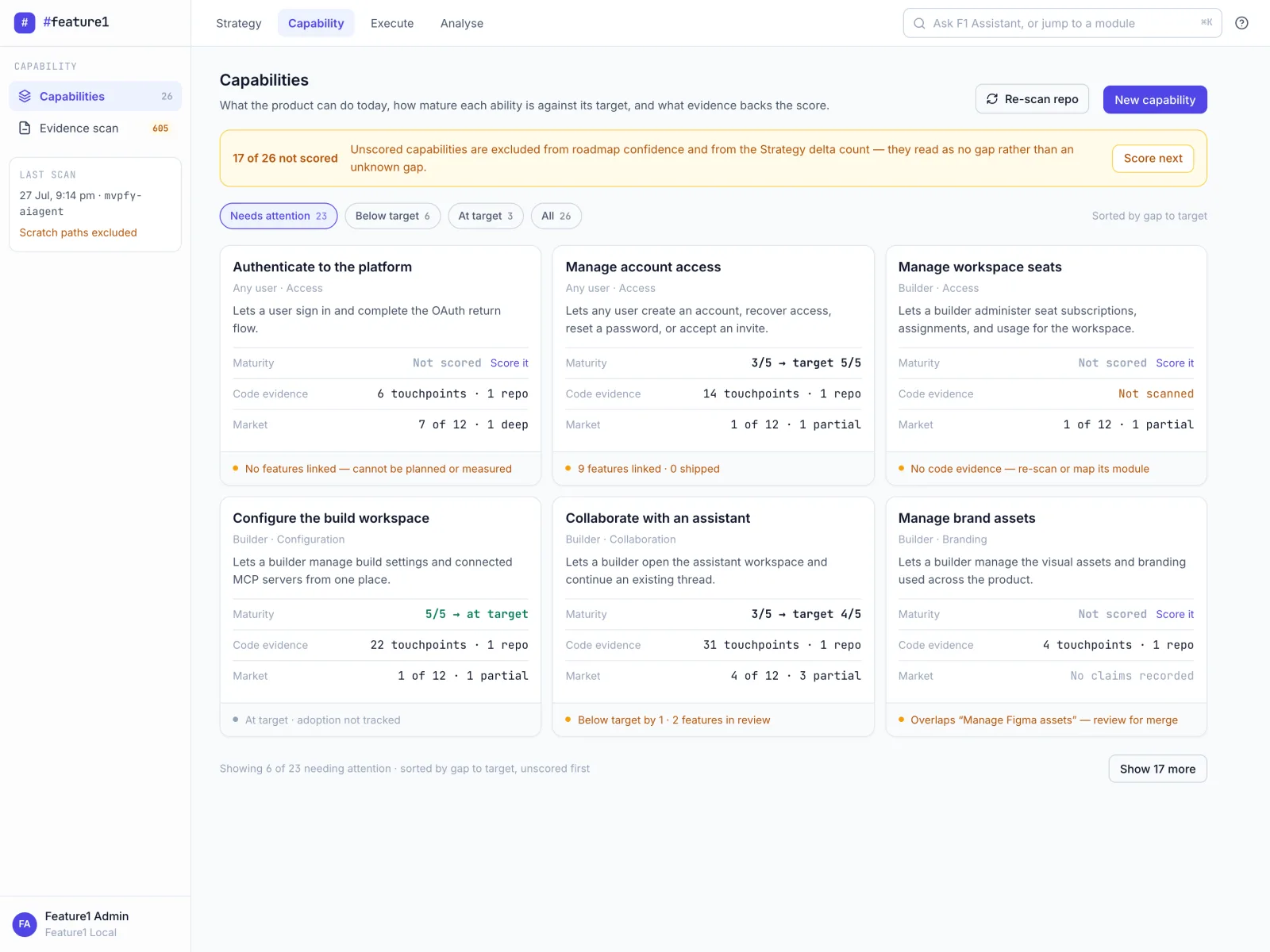
Capability evolution in Feature1: the product model stays grounded in what the codebase actually does.
Side by Side: Different Layers
A feature checklist would miss the point — the two tools mostly don't compete on features. Compare them by layer instead.
- Fast, keyboard-driven issue tracking engineers enjoy
- Cycles for a lightweight sprint rhythm
- Projects and roadmaps to roll work up
- Triage as a disciplined front door for incoming work
- Runs the loop: strategy → PRD → story → implementation → release
- Acceptance criteria that coding agents read over MCP
- Capability scans keep the roadmap grounded in shipped code
- Every artifact links back to the decision that caused it
Linear answers "what is engineering working on, and is this cycle on track?" Feature1 answers "why is this the right work, and did the shipped code deliver what we decided?"
When to Choose Which
- Linear alone is the right answer if your team's pain is execution speed and tracker friction, not lost product context. A small engineering-led team that plans informally and just needs fast, well-designed issue tracking has no reason to add another system. If your product decisions are made by the same few people who write the code, the intent may never fragment in the first place.
- Feature1 alongside Linear fits teams whose pain sits around the tracker: strategy docs, research, and PRDs scattered across tools, stories re-typed into issues, and no trail from a merged PR back to the objective it served. Feature1 carries that thread — strategy, planning, agent-driven implementation over MCP, release — while Linear keeps doing what it does best for engineering execution. Your tools can stay.
- Feature1 as the operating layer makes the most sense for product managers, founders, and product leaders who want one connected view from customer signal to sprint-ready stories to pull request — with the codebase attached as evidence of what the product actually does.
Explore the full platform feature set or see how it works to understand the complete workflow.
Frequently Asked Questions
Is Feature1 a Linear alternative?
Not in the direct sense. Linear is a fast issue tracker for engineering execution; Feature1 is a product operating system that runs the loop from strategy through PRDs, stories, and acceptance criteria to implementation and release. They operate at different layers, and many teams will use both.
Does Feature1 replace my issue tracker?
It doesn't have to. Feature1's pitch is explicitly "your tools can stay." Engineering can keep tracking execution in Linear while Feature1 holds the connected model — signals, objectives, features, stories, sprints — and the trail from each decision to the shipped code.
What does Feature1 do that an issue tracker doesn't?
It carries product intent end to end. A strategic decision becomes PRDs, stories, and testable acceptance criteria without re-entering context; coding agents like Claude Code, Cursor, and Codex CLI implement from those criteria over MCP; and capability scans keep the product model grounded in what the codebase actually does after release.
How do I get access to Feature1?
Feature1 is in private beta. You can request access to join the waitlist.