
What Jira Does Well
To be genuinely fair: Jira earned its position. Atlassian built the tool that made agile project management workable at scale, and for engineering teams that need structured issue tracking, it remains a serious piece of software. Boards, sprints, and backlogs cover the core agile rituals out of the box. JQL gives power users a query language expressive enough to slice work any way a team needs. The marketplace and ecosystem around Jira are enormous — if a workflow exists somewhere in software development, there is probably an integration or app for it.
Jira is also one of the few tools in this category genuinely built for enterprise reality. Configurable workflows, permission schemes, and audit-friendly process controls mean large organizations can encode how they actually work — approvals, handoffs, compliance steps — rather than bending their process to fit the tool. That flexibility has a learning curve, but for companies that need it, few alternatives match it.
None of what follows argues that Jira is bad at issue tracking. It is very good at issue tracking. The comparison is about a different question: what happens to a feature before it becomes a ticket, and after the ticket is closed.
The Core Distinction: The Ticket Loses the Intent
Jira manages work items. A ticket is a unit of work: a title, a description, a status, an assignee. That is exactly what an engineering team needs to execute a sprint. But by the time a strategic decision has been translated into a ticket, most of its context is gone. Why this feature? Which customer signal or objective does it serve? What does "done" mean in terms of the product, not just the code? The ticket rarely carries any of that — and Jira was never designed to.
Feature1 is a product operating system: one connected model that runs the loop from strategy through planning — PRDs, user stories, acceptance criteria — into implementation and release. Signals, objectives, capabilities, features, stories, and sprints live in a single product model, so the reason behind the work survives all the way to shipped software. Nothing is re-typed between strategy and code; every artifact links back to the decision that caused it.
Two things make this more than a documentation exercise. First, implementation is connected, not handed off: coding agents like Claude Code, Cursor, and Codex CLI read Feature1's stories and acceptance criteria directly over MCP, so the engineering AI works from what the product team actually decided — on repos in GitHub, GitLab, or Bitbucket. Second, the codebase is attached as evidence: capability scans keep the product model grounded in what the code actually does today, so the roadmap describes the real product, not a diagram of how it could work.
This is a different layer, not a Jira replacement. Many teams will keep Jira as the system of record for engineering tasks. Feature1 carries the product intent the ticket loses — from the signal that started it to the release communication that closes the loop.
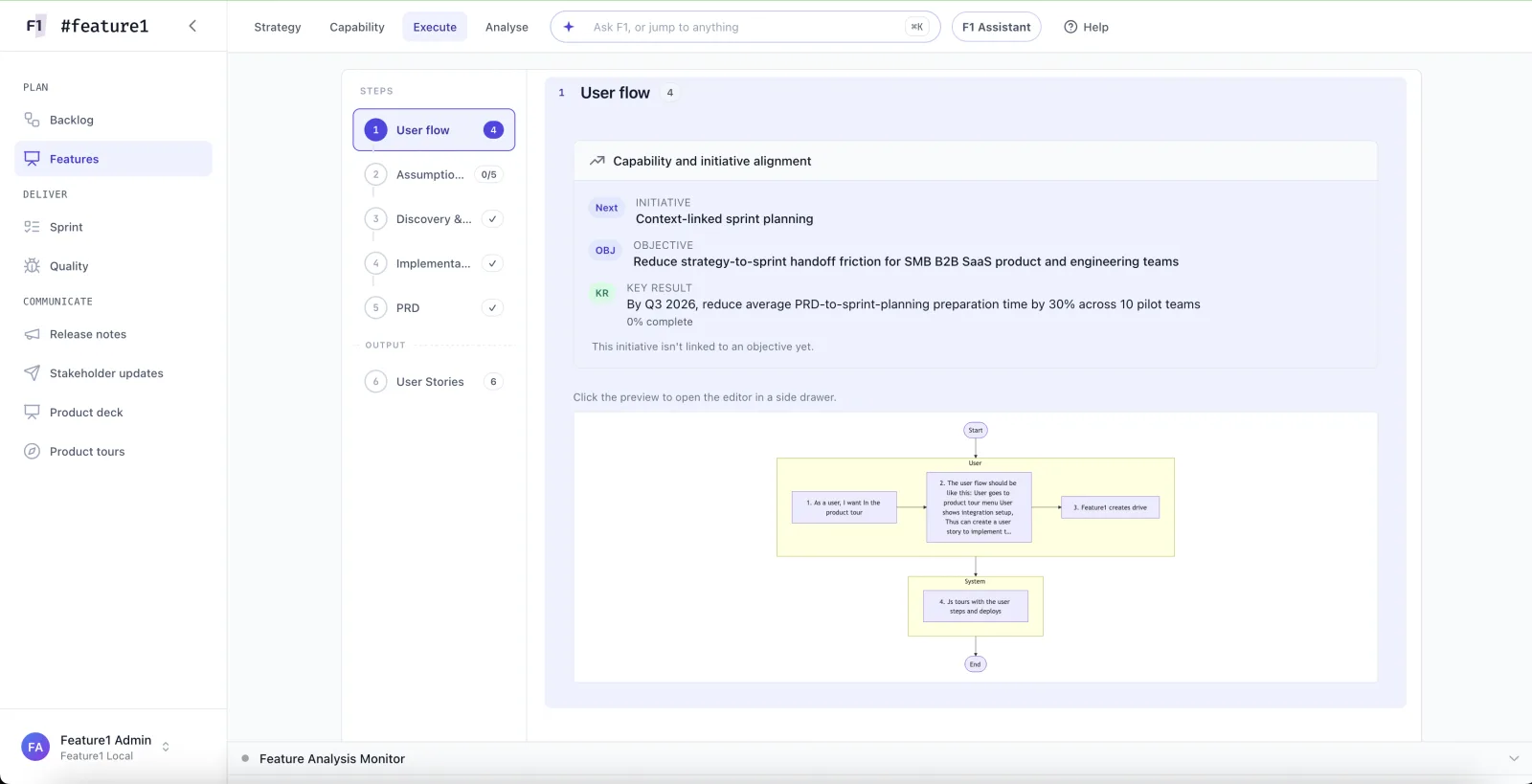
Feature planning in Feature1: features, stories, and acceptance criteria stay linked to the strategy that caused them.
Side by Side: Different Layers
The cleanest way to see the difference is by layer, not by feature checklist.
- Tracks work items: issues, boards, sprints, backlogs
- JQL for querying and slicing work across projects
- Deep ecosystem of marketplace apps and integrations
- Enterprise workflows, permissions, and process control
- Runs the loop: strategy → PRD → story → implementation → release
- Acceptance criteria that coding agents read over MCP
- Capability scans keep the roadmap grounded in shipped code
- Every artifact links back to the decision that caused it
Notice these lists barely overlap. Jira answers "what is the team working on and where does it stand?" Feature1 answers "why is this the right work, and did we ship what we decided?"
When to Choose Which
- Jira alone is the right answer if your bottleneck is execution tracking, not product context. An engineering team that receives well-specified work and needs boards, sprints, and enterprise-grade workflow control doesn't need another system. The same holds if your organization has standardized on Atlassian and the cost of that fragmentation is one you've consciously accepted.
- Feature1 alongside Jira fits teams whose pain is upstream and downstream of the ticket: strategy in one doc tool, PRDs in another, stories re-typed into Jira, and no trail from a shipped PR back to the objective it served. Feature1 carries that thread — strategy, planning, agent-driven implementation over MCP, release — while Jira keeps doing what it does well for engineering task tracking. Your tools can stay.
- Feature1 as the operating layer makes the most sense for product-led teams — PMs, founders, product leaders — who want the path from a customer signal to sprint-ready stories to a pull request to live in one connected model, with the codebase attached as evidence of what the product actually does.
Explore the full platform feature set or see how it works to understand the complete workflow.
Frequently Asked Questions
Is Feature1 a replacement for Jira?
Not necessarily. Jira tracks engineering work items; Feature1 runs the product loop from strategy through PRDs, stories, and acceptance criteria to implementation and release. Many teams keep Jira for engineering task tracking while Feature1 carries the product intent that a ticket doesn't hold.
Can my team keep using Jira alongside Feature1?
Yes. Feature1's pitch is explicitly "your tools can stay." It becomes the connected layer where strategy, planning, and delivery evidence live — it doesn't require ripping out the issue tracker your engineering team already runs on.
How does Feature1 connect planning to implementation?
Through MCP. Coding agents such as Claude Code, Cursor, and Codex CLI read Feature1's user stories and acceptance criteria directly, so implementation starts from what the product team actually decided. Feature1 works with repos on GitHub, GitLab, and Bitbucket, and capability scans keep the product model grounded in the shipped code.
Is Feature1 available today?
Feature1 is in private beta. You can request access to join the waitlist.