What ChatGPT Does Well for Planning
To be genuinely fair: ChatGPT is an impressive planning tool in many contexts. If you are early in an idea, without a codebase, without established conventions, and you need to think out loud with an intelligent counterpart — ChatGPT excels.
- Brainstorming at speed. Describe a problem and get a range of approaches, angles, and counter-arguments within seconds. The breadth of response is difficult to match.
- Generating user stories in isolation. Given a feature description, ChatGPT can produce well-structured user stories in standard formats, including INVEST-compliant ones, without any prompt engineering.
- General technical guidance. Questions about architecture patterns, database design principles, API conventions, or technology trade-offs are well within ChatGPT's capability when they do not depend on your specific codebase.
- Rapid first drafts. Generating a planning document, a feature brief, or a product requirements outline is fast and often surprisingly good — good enough as a starting point.
These are real strengths. The comparison that follows is not about dismissing ChatGPT. It is about identifying exactly where it breaks down for production feature planning — and why those gaps matter.
Where ChatGPT Falls Short
No Codebase Context
ChatGPT does not know your codebase. It cannot see your database schema, your API design patterns, your component library, or your existing service boundaries. Every suggestion it makes is built on a generic approximation of how software is usually structured — not how your software is actually structured.
This creates concrete problems. It might suggest creating a users table when you already have one. It might recommend introducing a state management library when you are already using Pinia with a carefully designed store pattern. It might propose an API endpoint shape that conflicts with your existing conventions. The output looks right. It just does not map to your codebase without a manual translation step that costs hours of engineering time.
No Team Collaboration
A ChatGPT conversation lives in a chat window. There is no native way to share it with your team, track decisions inside it, or maintain context across sessions. You copy-paste the output into Slack, Notion, Google Docs, or a Jira ticket. Your co-founder adds comments in one place. Your engineer has questions in another. Your designer is working from a different version.
The plan fragments almost immediately after it is created. Decisions are not tracked. Context is lost. No one has a single shared view of where the feature stands.
Plans Don't Become Actions
ChatGPT produces text. It cannot create a Jira ticket, write a structured acceptance criterion, assign an item to a sprint, or connect anything to your development workflow. After you get the plan, you still manually translate every part of it into your project management tool, write ACs yourself, and manage the handoff to engineering by hand.
The plan and the execution live in completely different systems with no structural connection between them. Features fall through the gap — not because the plan was bad, but because the plan was never truly connected to the work.
No Follow-Through
Once you leave the ChatGPT session, the AI has no awareness of what happens next. Three weeks later, when the feature is built, there is no mechanism to verify the implementation matches the plan. ChatGPT cannot see the code that was written, compare it to the original specification, or tell you which parts of the plan were implemented faithfully and which drifted during development.
The plan becomes a static document — or, more often, a forgotten chat history — with no connection to the shipped code.
How Feature1 Solves Each Problem
Feature1 was built specifically for feature planning on production codebases. Each ChatGPT limitation maps directly to a capability in the platform.
- Domain Spec provides codebase context. Feature1 builds a living knowledge graph of your codebase — your architecture, data models, conventions, and patterns. Every feature plan, every user story, and every acceptance criterion is grounded in what actually exists in your repo. No translation step required.
- Shared threads replace scattered copy-paste. The F1 Assistant supports shared threads with status tracking — ideating, in progress, blocked, done. Your entire team works inside the same planning context. Decisions are preserved. Context is never lost between sessions.
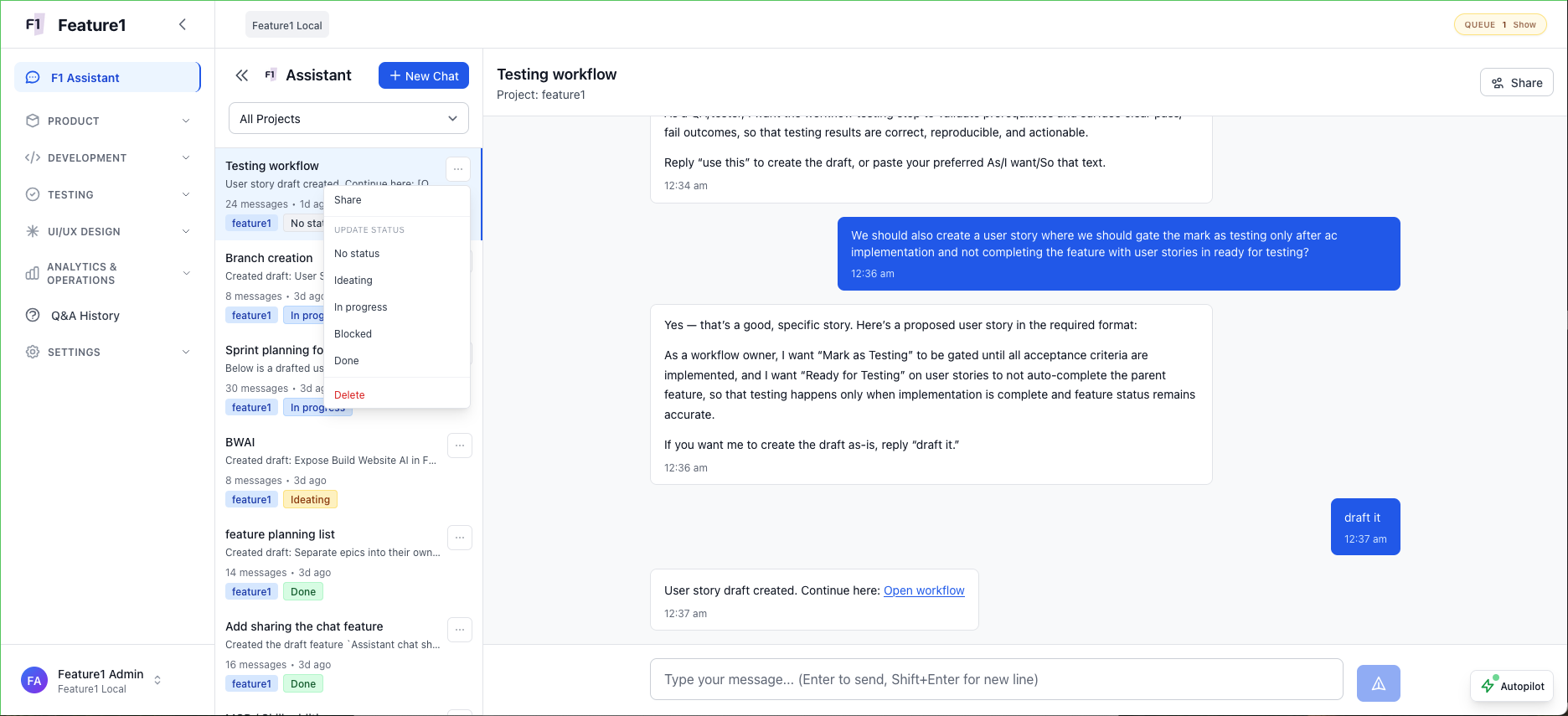
F1 Assistant: shared threads with status tracking. Say "draft it" and a conversation becomes a user story.
- Plans become actions in one platform. Feature analysis generates structured user stories. User stories generate testable acceptance criteria. ACs are implemented by AI in Autopilot or Copilot mode. Pull requests are created automatically. See the full plan-to-PR pipeline to understand how each step connects.
- Full visibility into code changes. Your GitHub, GitLab, or Bitbucket repo is connected to Feature1. The AI agent runs directly in your codebase — every commit, every diff, every branch is visible. Feature1 doesn't just track which ACs are "done" — it knows the actual code changes, which files were modified, and how each change maps to the acceptance criterion it implements.
Side by Side: ChatGPT vs Feature1
Here is a direct comparison of what each tool gives you when you are trying to plan and ship a real feature on a production codebase.
- No codebase awareness — generic suggestions only
- Chat-only output — no native team sharing
- Manual handoff to Jira, Linear, or Notion
- No visibility into what was actually built
- Domain Spec — living knowledge graph of your codebase
- Shared threads with team status tracking
- Plan → Story → AC → Code → PR in one platform
- Repo connected — every commit, diff, and branch visible
When to Use Each
The answer is not that ChatGPT is useless — it is that each tool has a distinct place in the workflow.
- Use ChatGPT for early-stage brainstorming before you have a codebase, when you are exploring problem space without established architecture, or when you need general technical answers that are not specific to your system.
- Use Feature1 once you have a codebase and need to ship. When codebase context matters, when your team needs a shared view of the plan, and when you need the plan to translate directly into user stories, acceptance criteria, and merged pull requests.
There is a natural handoff point: ChatGPT for the earliest thinking, Feature1 once there is a repo and a team that needs to move from plan to production. For a deeper look at why general-purpose AI chatbots fall short for this work, see Stop Using ChatGPT for Feature Planning.
Explore the full platform feature set or see how it works to understand the complete workflow.